
Too many WordPress plugins slow your site down, create security risks, and make maintenance a nightmare. Here is what I find on client sites and what to do instead.
Every WordPress site I audit has too many plugins. Not a few too many. Sometimes thirty, forty, occasionally more. Plugins installed for things that should have been solved with ten lines of code. Plugins doing the same job as two other plugins already installed. Plugins that have not been updated in two years, sitting there quietly, doing damage.
This is one of the most common and most avoidable performance problems in WordPress. And almost nobody talks about it.
What Plugins Actually Cost You
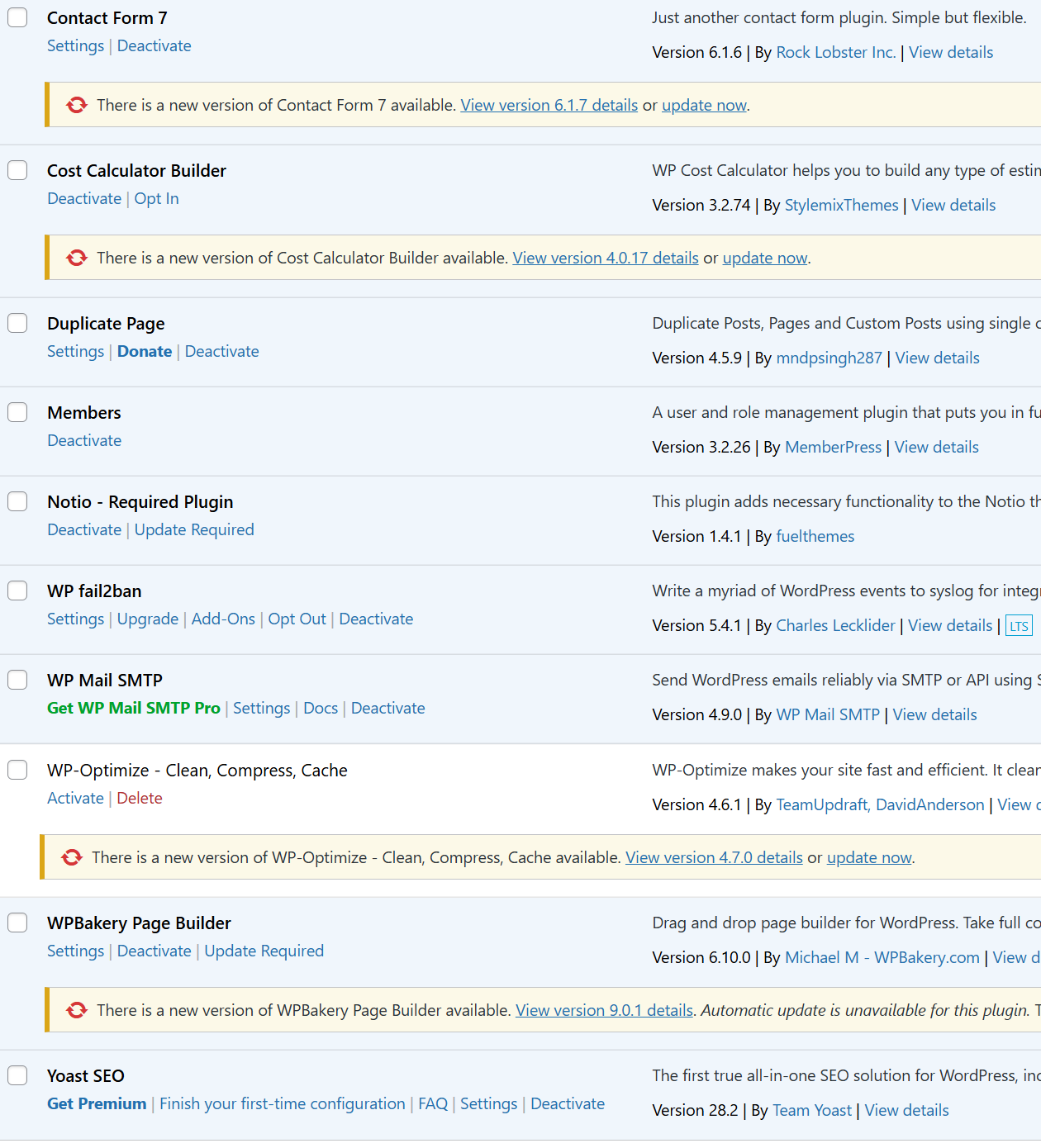
Every plugin you install adds weight to your site. Some add database queries on every page load. Some load JavaScript and CSS files across the entire site, even on pages where they do nothing. Some register their own cron jobs that run in the background whether you need them or not.
A plugin for a contact form. A plugin for a cookie banner. A plugin for social sharing buttons. A plugin to add a redirect. A plugin to change the login page URL. A plugin to remove the WordPress version number from the header. Each one seems small on its own. Together they add up to a site that loads in six seconds when it should load in one.
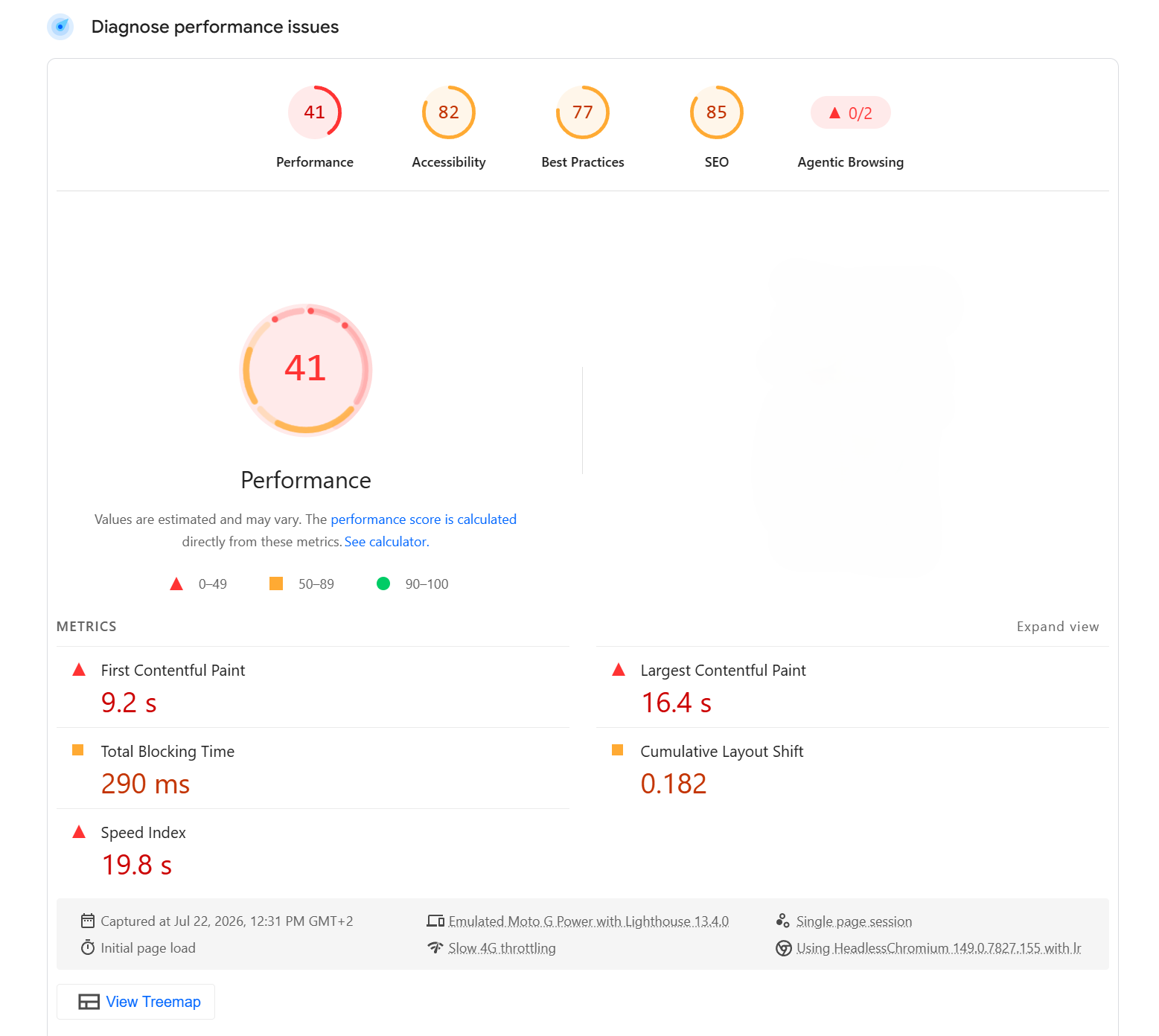
That 41 PageSpeed score came from a site with a page builder and more plugins than anyone could justify. The client thought their site was fine. Google disagreed. So did their bounce rate.
The Duplicate Plugin Problem
The one that surprises people most: multiple plugins doing exactly the same thing.
I have opened client sites with two caching plugins active at the same time. Sites with three different SEO plugins installed, each one adding its own meta tags to every page, conflicting with each other. Sites with both a security plugin and a firewall plugin that overlap in almost every feature they offer.
This happens because WordPress sites grow over time. Someone installs a plugin to solve a problem. Months later someone else installs a different plugin for what seems like a different problem but is actually the same one. Nobody is keeping track. The plugins accumulate.
Two caching plugins do not give you twice the caching. They give you conflicts, unpredictable behaviour and a slower site than if you had used one properly configured plugin from the start.
Plugins Installed for One Small Thing
This is the one that frustrates me most.
A plugin installed to add a single CSS class to the body tag. A plugin to remove the "Howdy" greeting from the WordPress admin. A plugin to change the number of posts shown on an archive page. A plugin to add a noindex tag to one specific page.
Every one of these is a few lines of code in a child theme's functions.php file. Instead they are separate plugins, each with their own database tables, their own update cycle, their own potential for conflicts and their own contribution to a bloated site.
When a developer reaches for a plugin before considering whether the problem can be solved in code, the plugin list grows. When a client installs plugins themselves without guidance, the plugin list grows. When nobody ever reviews what is actually installed and still needed, you end up with a plugins page that scrolls for three screens.
What a Reasonable Plugin List Looks Like
A well-built WordPress site does not need thirty plugins. Most sites function well with somewhere between eight and twelve, covering the essentials: SEO, caching, security, backups, forms, and any functionality genuinely too complex to build from scratch.
Everything else should be a question: does this actually need to be a plugin, or can it be a few lines of code? Is this plugin still maintained? Is it doing something another plugin already does? When was it last used?
Reviewing the plugin list is one of the first things I do on any client project. It is rarely a comfortable conversation. But it is almost always a necessary one.
The plugin count is not a measure of a site's capability. It is usually a measure of how many shortcuts were taken and how many problems were never properly solved.
Share this article