After auditing 10 WordPress sites this year, the same problems kept coming up. Performance, security, accessibility — here is what I found every time.
This year I audited ten WordPress sites for clients. Some were small business sites. Some were established platforms with years of content. The budgets were different, the industries were different, the developers who built them were different.
The problems were almost identical every time.
This is not a post about edge cases. These are the things I find on nearly every WordPress site I look at — and most of them are fixable in an afternoon.
Performance: The Score Nobody Wants to See
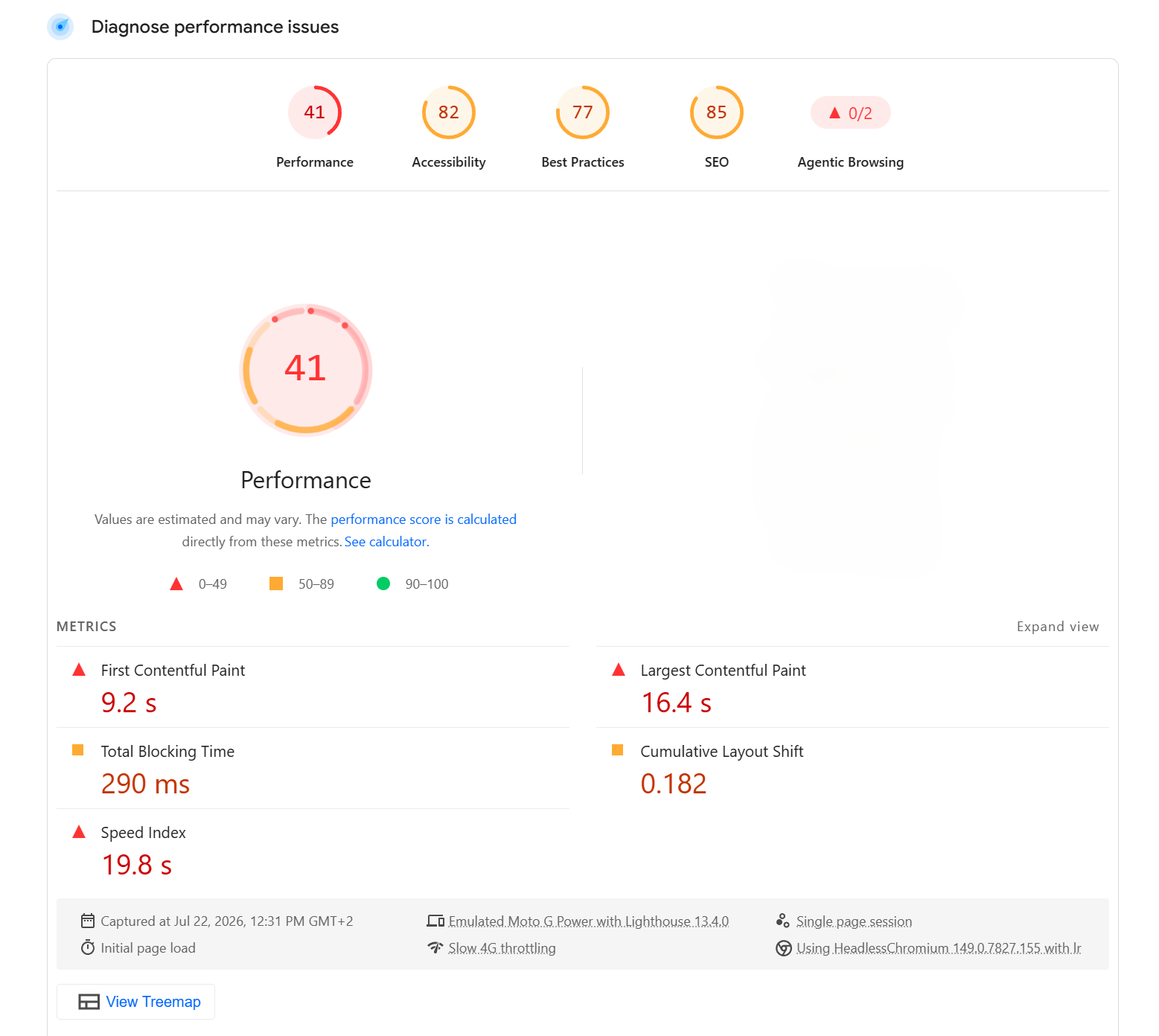
The first thing I run on any site is a PageSpeed Insights test. On mobile. Not desktop — mobile is what Google uses for ranking, and it is always the harder score to achieve.
The lowest score I saw this year was 41. The client had no idea. Their site felt fine to them because they were testing it on a fast laptop on a good connection. Their customers were on phones with average mobile connections and waiting 16 seconds for the page to load.
The cause in that case was a page builder. Elementor and WPBakery load significant JavaScript and CSS on every page regardless of whether that page uses the features or not. A simple homepage with a header, some text and a contact form was loading dozens of scripts it did not need.
This came up on seven of the ten sites I audited. Not always Elementor. Sometimes Divi. Sometimes WPBakery, which I also found on one site running three major versions behind the current release. The pattern was the same: a page builder installed years ago, never questioned, quietly making the site slower every time a new feature was added.
Security: The Plugins Nobody Updated
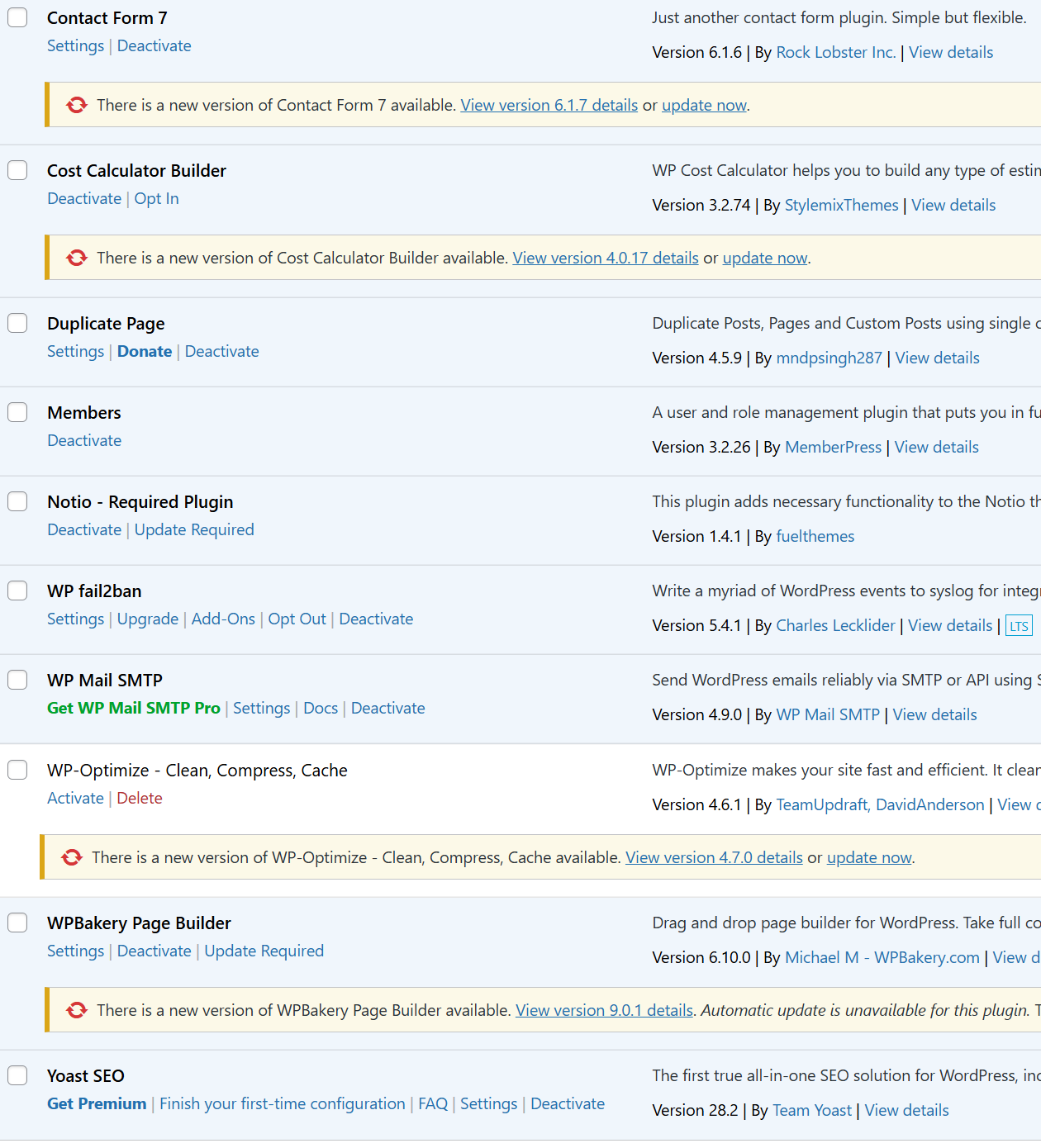
Every site I audited had outdated plugins. Every single one.
The most common pattern: a plugin that had not been updated in six months or more, sitting on a version with a known vulnerability. Plugin developers publish changelogs. Security researchers publish CVEs. The information is public. The only thing standing between a site and an attacker exploiting a known vulnerability is running the update.
One site had WPBakery on version 6.10.0. The current version is 9.0.1. That is not a minor gap. Three major versions behind means missing years of security patches, not just new features.
Another had WP-Optimize installed — a perfectly good caching and optimisation plugin — but it was not activated. It was just sitting there, doing nothing, but still present as a potential attack surface.
The reason this happens is almost always the same: the site was handed over to a client after launch with no maintenance plan in place. Nobody owns the updates, so nobody does them. The developer moved on. The client does not know they need to update anything. Months pass. Then years.
Outdated plugins are the most common entry point for WordPress site compromises. This is not a theoretical risk. It is the reason most WordPress hacks happen.
Accessibility: The Issues Nobody Checked
Every site I audited had accessibility failures. Every single one.
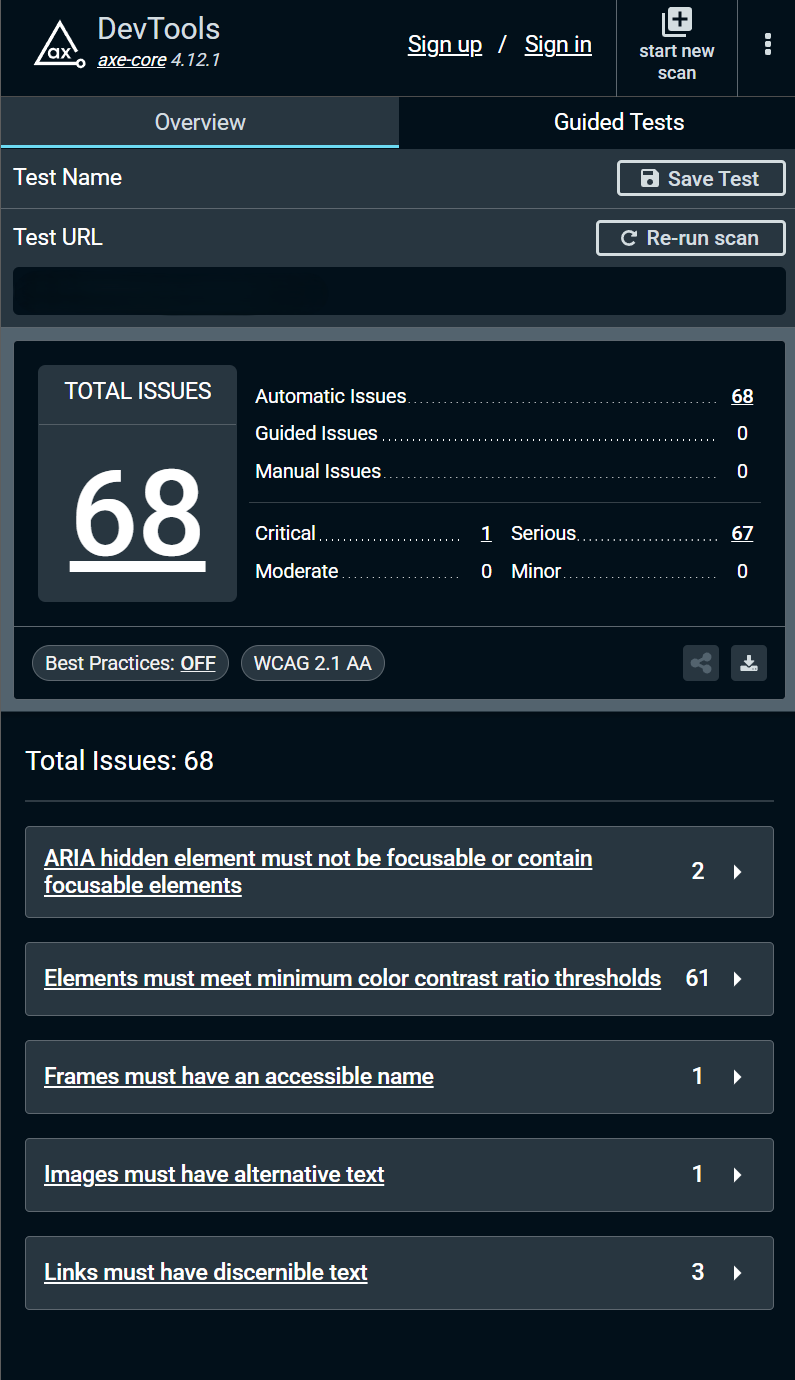
Color contrast failures on body text. Background images with no alternative text. Navigation links a screen reader could not interpret. Form labels not connected to their inputs.
These were not edge cases. They were standard components — headers, buttons, forms — built without accessibility in mind.
The EU Accessibility Act came into force in 2025. WCAG 2.1 AA compliance is now a legal requirement for public-facing websites in Europe. Most of the sites I audited this year are not close to compliant.
The fixes for most accessibility failures are not complicated. Sufficient color contrast is a design decision. Alt text is a content decision. Semantic HTML is a development decision. These things do not require a rebuild. They require a process for checking before you ship — and most WordPress development workflows have no such step.
The Same Three Problems. Ten Sites. Every Time.
Ten sites. Different clients, different industries, different budgets. The same three problems.
Page builders degrading performance. Plugins nobody is updating. Accessibility nobody is testing.
This is the state of most WordPress sites out there. Not because the technology is bad. WordPress is capable of producing fast, secure, accessible websites. But the shortcuts taken during development — the page builder installed because it seemed easier, the maintenance plan never set up, the accessibility audit never run — compound over time into sites that are slow, vulnerable and unusable for a significant portion of visitors.
A WordPress site built properly from the start avoids most of these problems. Clean code, no page builder bloat, a real update process and accessibility checks built into the workflow. It takes more time upfront. It costs less to own over time.
Share this article