
Accessibility in WordPress is no longer a nice to have. The EU Accessibility Act came into force in 2025 and most WordPress sites are nowhere near compliant. Here is what you need to know.
For most of the web's history, accessibility has been treated as optional. Something you think about if you have time, if the budget allows, if the client asks for it. A feature you add at the end rather than build in from the start.
That approach has a legal deadline now.
The EU Accessibility Act came into full force in June 2025. It requires that digital products and services — including websites — meet WCAG 2.1 AA accessibility standards. This is not a guideline. It is a legal requirement with real consequences for non-compliance.
If your WordPress site serves customers in the European Union, this applies to you.
What the EU Accessibility Act Actually Requires
The EU Accessibility Act is a piece of European legislation that has been in development since 2019. It covers a broad range of digital products and services including websites, mobile applications, e-commerce platforms, and banking services.
The accessibility standard it requires is WCAG 2.1 AA — the Web Content Accessibility Guidelines version 2.1 at the AA conformance level. This covers four core principles: content must be Perceivable, Operable, Understandable, and Robust.
In practical terms for a WordPress website this means things like sufficient colour contrast, keyboard navigability, proper heading structure, alternative text for images, accessible forms, and meaningful link text. Not exotic requirements — basic standards that most websites fail to meet simply because nobody checked.
Who It Applies To
The Act covers businesses providing products or services to customers in EU member states. If you sell products online to European customers, run a service used by European clients, or operate any kind of public-facing digital platform that reaches European users, the Act applies to your website.
Micro-enterprises with fewer than ten employees and an annual turnover below two million euros are currently exempt. But this exemption is narrow and the threshold is low. Most businesses operating at any meaningful scale fall within scope.
Outside the EU, similar legislation exists or is developing in many other jurisdictions. The UK Equality Act covers accessibility for public sector organisations and service providers. Section 508 in the United States applies to federal agencies and organisations receiving federal funding. Australia, Canada, and many other countries have equivalent requirements in various stages of implementation.
The direction of travel globally is clear. Accessibility is becoming a legal requirement, not a best practice recommendation.
What Non-Compliance Actually Means
The consequences of non-compliance vary by EU member state since enforcement is handled nationally, but they include formal complaints, regulatory investigations, and financial penalties. More immediately relevant for most businesses is reputational risk — a public accessibility complaint is the kind of story that travels.
Beyond the legal risk, there is a straightforward business argument. Around 1 in 6 people globally lives with some form of disability. Visual impairments, motor difficulties, cognitive differences, hearing loss — these affect a significant portion of any website's potential audience. An inaccessible website is not just a compliance failure. It is a website that is actively excluding a large segment of potential customers.
Where Most WordPress Sites Stand
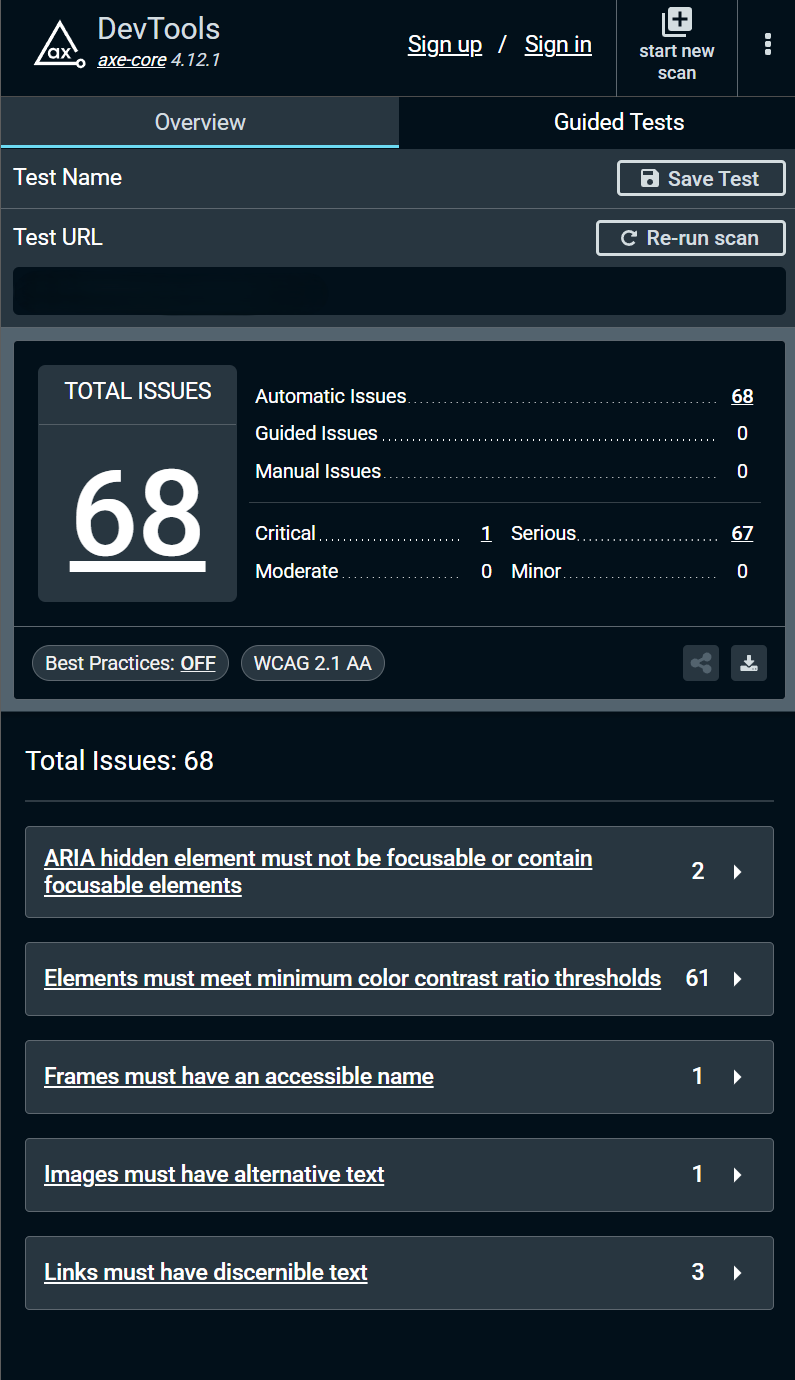
This is what a typical WordPress site looks like when you run an accessibility audit. 68 issues. 67 of them serious. Colour contrast failures across most of the text. Images without alternative text. Links a screen reader cannot interpret. ARIA attributes applied incorrectly.
This is not an unusual result. It is what most WordPress sites produce when you look properly for the first time.
The issues are not difficult to fix individually. The problem is that they accumulate invisibly over years of development where accessibility was never part of the conversation. By the time someone runs an audit, there are dozens of failures spread across every page and template.
What WCAG 2.1 AA Compliance Actually Looks Like
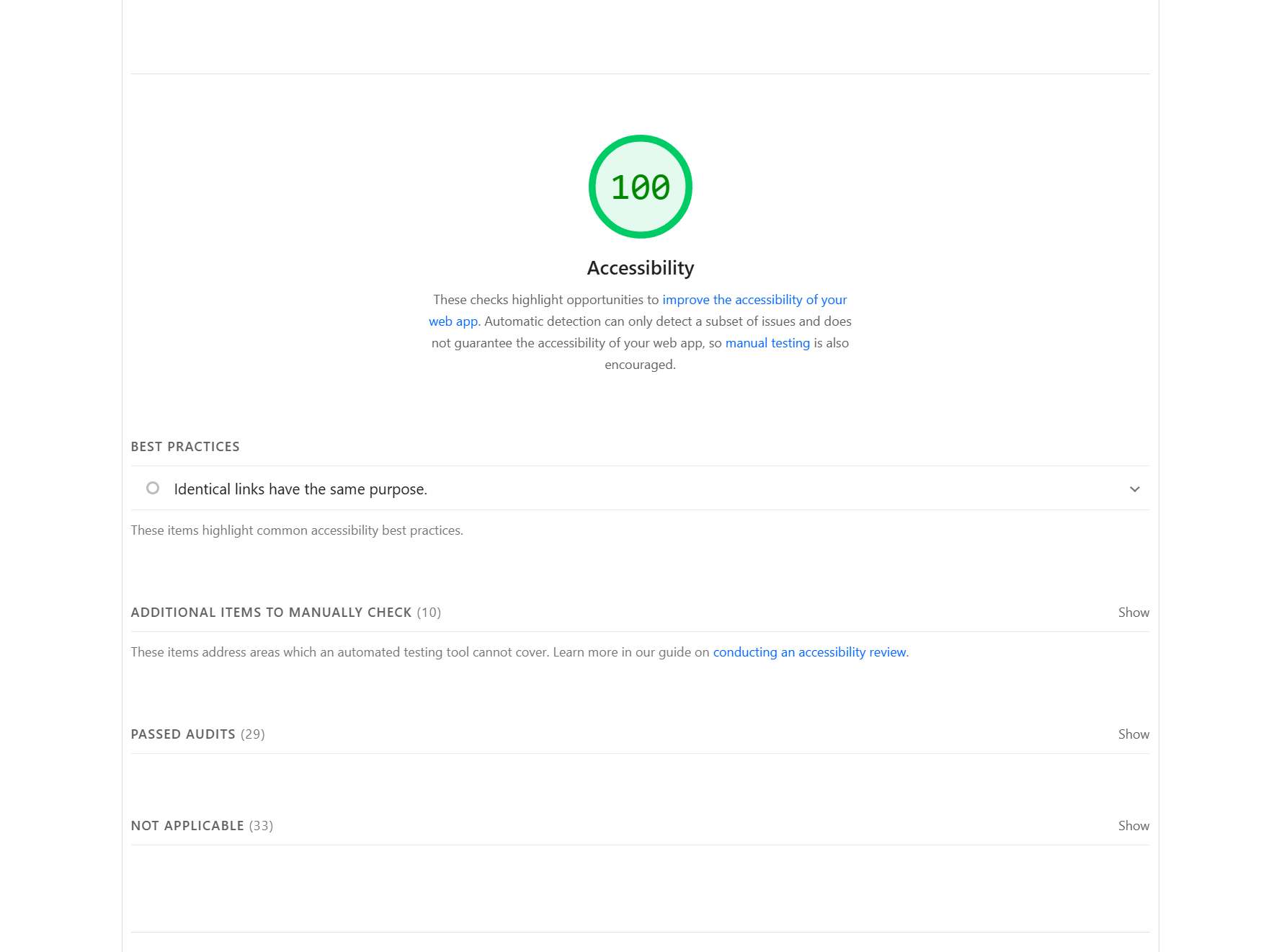
A score of 100 on the Lighthouse accessibility audit. This is achievable on every WordPress project when accessibility is built in from the start rather than added afterwards.
The difference between a site that scores 100 and a site that scores 40 is not talent or budget. It is process. Using semantic HTML correctly. Setting sufficient colour contrast. Adding ARIA labels to landmark sections. Making every interactive element keyboard accessible. Testing with an automated scanner before the site goes live.
None of these are technically difficult. All of them require intention.
The Problem with Retrofitting Accessibility
The most expensive way to achieve accessibility compliance is to build a site without thinking about it and fix it afterwards.
When accessibility is ignored during development, the failures embed themselves into the structure of the site. A heading hierarchy that makes no semantic sense. Interactive components built from divs instead of native HTML elements. Colour choices baked into the design system that all fail contrast requirements. Background images used throughout with no ARIA attributes.
Fixing these after the fact means going back through every page, every template, every component. It means design changes, development time, and retesting. On a large site this can easily become a significant project in its own right.
Building with accessibility from the start costs almost nothing extra. The semantic HTML is the same amount of code. The colour contrast check takes two minutes. The ARIA labels are a few lines per component. The keyboard test takes five minutes per page.
The cost of accessibility is front-loaded and small. The cost of retrofitting it is back-loaded and large.
What to Do If Your WordPress Site Is Not Compliant
The first step is knowing where you stand. Run your site through axe DevTools — a free Chrome extension — and through the Lighthouse accessibility audit in Chrome DevTools. This gives you a clear picture of what is failing and how severely.
From there, fixes fall into two categories. Quick wins are things like missing alt text, insufficient colour contrast, and missing form labels — these can often be addressed without touching the codebase. Structural fixes are things like incorrect heading hierarchy, inaccessible interactive components, and ARIA misuse — these require development work.
If your site has significant accessibility issues, working with a developer who builds with accessibility in mind from the start is the most efficient path to compliance. Retrofitting piecemeal tends to fix the surface issues while missing the structural ones.
The Bigger Picture
Accessibility legislation is not going away. The EU Accessibility Act is part of a broader global shift toward treating digital accessibility as a right rather than a courtesy. The businesses that treat this as a compliance checkbox to tick will spend more, fix less, and face more risk than the ones that make accessibility a standard part of how they build.
For WordPress site owners, the practical message is simple. If you have not had an accessibility audit, get one. If your site has significant issues, prioritise fixing them. And if you are commissioning a new WordPress site, make WCAG 2.1 AA compliance part of the brief from day one.
The deadline has passed. The question now is how quickly you close the gap.
Need an accessibility audit or a WordPress site built to WCAG 2.1 AA standards? Get in touch.
Share this article